News · Workflow Automation · AI Products & Copilots
Gemini for Mac gains computer use for paid US subscribers
Google's Mac app can now operate native apps, local files and websites for AI Plus, Pro and Ultra subscribers in the US, with pause, stop and approval controls.
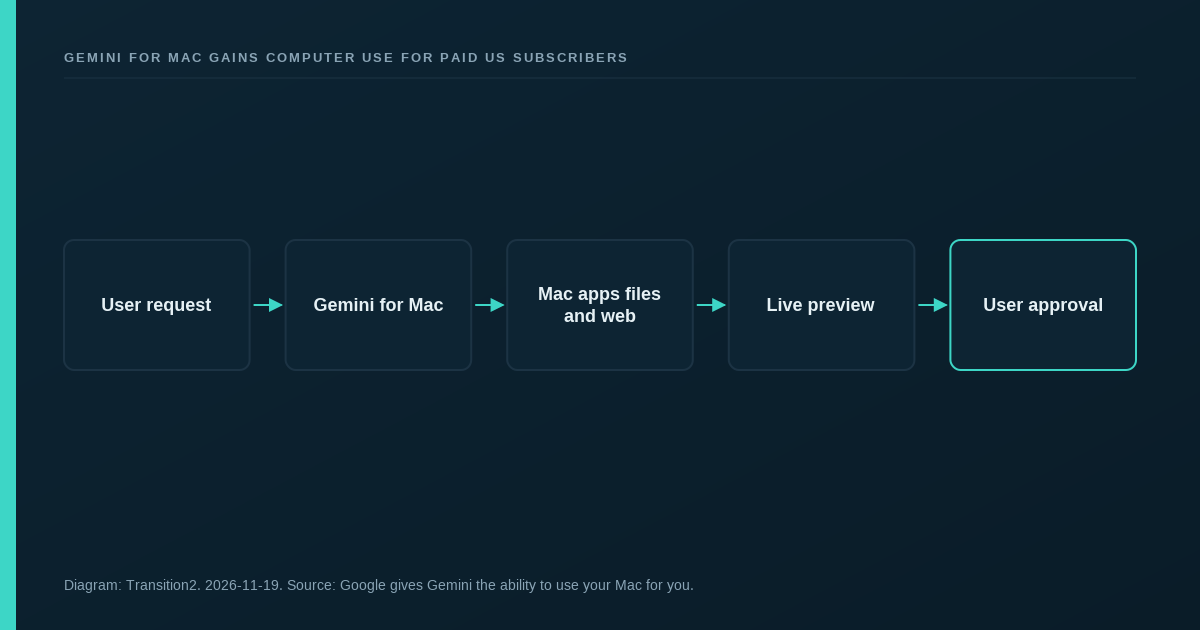
On Thursday, November 19, 2026, Google added computer use to the Gemini desktop app for macOS, letting Gemini carry out tasks across native Mac apps, local files and websites (TechCrunch). The feature requires a Google AI Plus, Pro or Ultra subscription and is rolling out first in the US, in English, with no date given for wider availability (FoneArena). Users can watch progress, pause or stop a task, and approve key actions before they happen.
What happened
TechCrunch reported the launch on November 19, and FoneArena confirmed the feature in coverage the following day. According to TechCrunch, Gemini can now work across native Mac apps, local files and websites while the user's screen and cursor stay free for other work.
Eligibility is narrow at launch. The feature needs a Google AI Plus, Pro or Ultra subscription (TechCrunch). The initial rollout covers the US and English only, and no expansion date has been given (FoneArena). Google's Gemini for macOS product page says the app needs an Apple Silicon Mac running macOS Sequoia 15.0 or later, and that some Gemini desktop features are limited to users 18 and older.
The controls are the core of the product description. Progress shows in a live preview in the chat, and users can pause or stop a task and approve key actions before they happen, TechCrunch reports. FoneArena adds that users choose which apps Gemini can access.
The descriptions differ in two places. TechCrunch says the task runs in a live preview within the chat, while FoneArena describes an isolated background window. Both may be accurate if the background window is mirrored in the chat, but the coverage does not say so directly. Approvals differ too. Google's product page, which calls the capability "Tasks," says users "approve every action with one tap," while TechCrunch and FoneArena describe approving key actions. The Transition2 desk could not find a Google blog post announcing the feature.
Suggested uses include filling out forms, batch-processing files, organizing folders, and building slideshows from files or dashboards (TechCrunch). Google is not alone here: TechCrunch notes that OpenAI, Anthropic and Meta already offer similar desktop agents.
Why it matters
The change is one of scope. A chat assistant that drafts text leaves every action to the user. An assistant that operates native apps, local files and websites (FoneArena) acts directly on the machine where personal and work files live. The safeguards described in the coverage are the live preview, pause and stop, approvals before key actions, and the choice of which apps Gemini may access (TechCrunch, FoneArena).
The gap between "every action" on Google's product page and "key actions" in the coverage is not a small wording point. It determines how much of a task runs without a person confirming each step. Until Google documents which actions trigger an approval, users should not assume every click will ask first.
The rollout is also deliberately limited: paid tiers, the US, English, Apple Silicon and a recent macOS release (FoneArena, Google). For most Mac users outside those conditions, this is something to watch rather than something to use today.
The Transition2 desk did not run an experiment for this story, because computer use is a closed consumer feature that needs a paid Google account, an Apple Silicon Mac and the GUI app, and there is no public spec or library to test.
What it means for businesses
The coverage describes consumer subscription tiers (AI Plus, Pro and Ultra) and does not describe administrative controls for managed fleets (TechCrunch). Organisations whose staff use Macs should therefore decide now whether personal subscriptions with computer use are allowed on work machines, and under what conditions. Because Gemini can work with local files (FoneArena), the relevant policy question is less about the chat window and more about which folders and apps an agent may touch.
The per-app access choice (FoneArena) gives a natural point of control: a short approved list of apps is easier to reason about than open access. Teams comparing desktop agents from several vendors can evaluate them on the same questions: what is shown during a task, what requires approval, and how a task is stopped. The Workflow Automation hub covers how agent steps fit into business processes.
What it means for AI users
Eligibility comes first. Computer use needs an AI Plus, Pro or Ultra subscription, a US English setup, and an Apple Silicon Mac on macOS Sequoia 15.0 or later (Google, FoneArena). Some desktop features are limited to users 18 and older (Google).
For eligible users, the controls are the practical tools. Grant access only to the apps a task needs (FoneArena), keep an eye on the live preview, and use pause or stop if a task heads somewhere unexpected (TechCrunch). Lower-stakes suggested uses such as organizing folders or building a slideshow from files are a sensible place to start. Form filling deserves more care: read what Gemini has entered before approving a submission, especially where personal details or payments are involved.
What it means for developers
Computer use is a closed consumer feature, and the Transition2 desk found no public spec or library for it, so there is nothing to integrate against yet. The practical implication is on the receiving end. Mac apps and websites may now be operated by an agent acting for a user, including for filling out forms and batch-processing files (FoneArena).
Interfaces with clear labels, predictable layouts and explicit confirmation steps for irreversible actions serve human users and agents alike. Developers of apps that handle sensitive operations can review whether a destructive or payment step is clearly separated from routine steps, so that an approval prompt in an agent's flow lines up with a meaningful moment in the app.
Copyright Eric MacDougall.
Sources
- Google gives Gemini the ability to use your Mac for you (accessed 2026-11-20)
- Gemini for Mac gets computer use to automate tasks across apps and websites (accessed 2026-11-20)
- Gemini for macOS (product page) (accessed 2026-11-20)