News · Enterprise Knowledge Assistants · Data & Knowledge Foundations · Enterprise AI Governance
Permissioned retrieval for knowledge assistants under agent pressure
As MCP connectors and desktop agents reach more systems, knowledge assistants must enforce permissions at retrieval time and cite sources on every answer.
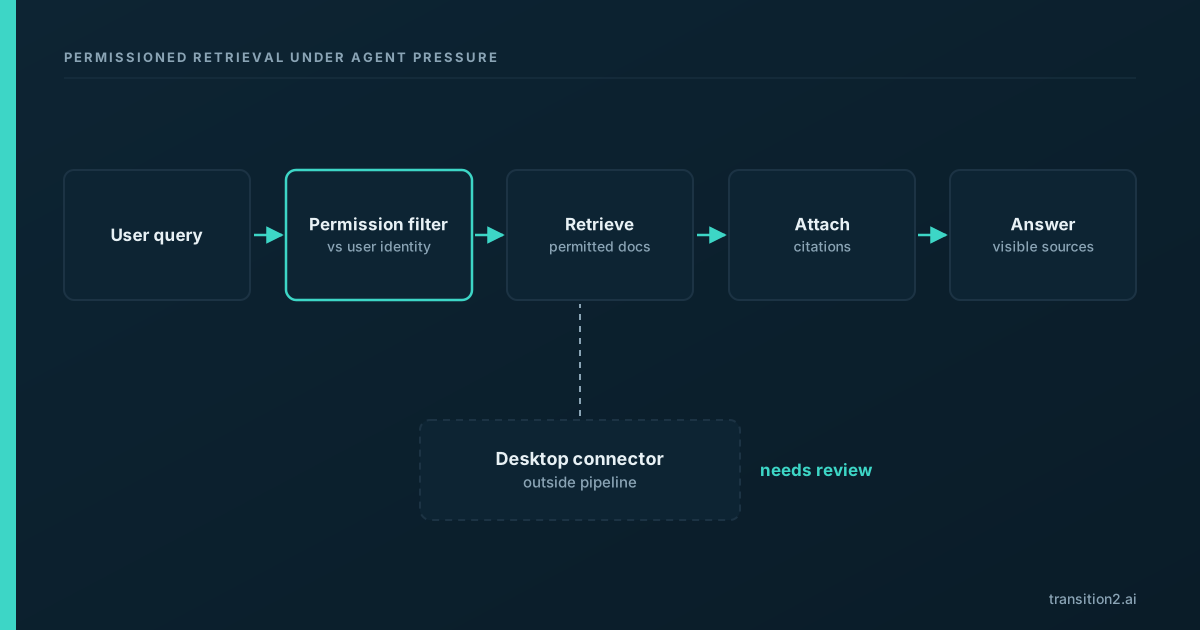
Two recent developments widen what an AI assistant can reach inside an organisation. Anthropic's enterprise-managed authorization for MCP connectors, generally available since August, makes the enterprise's identity system the control point for which knowledge tools an agent can call, and the open-source agent-desktop v1.2.0 release, published on November 4, shows a desktop exposed through MCP. For enterprise knowledge assistants, the consequence is that permissions have to be enforced at retrieval time, on every query, and every answer has to carry its sources.
What happened
Anthropic documents an enterprise-managed authorization model for MCP connectors: an admin authorizes a connector once, and users inherit access through the IdP groups and roles they already hold. One early customer quoted by Anthropic notes that personal identity passes through to each MCP host. For knowledge work, that turns the identity provider into the control plane for which document stores, wikis, ticketing systems and drives an assistant can query on behalf of a user.
The agent-desktop v1.2.0 release packages desktop control as an MCP server. Its MCP guide says a tool has the CLI's full reach and should be treated like a shell for the signed-in user, which can include local files. That is a different path from an application's retrieval layer: an assistant that reads files directly through a desktop connector is not going through whatever permission checks and source tracking the organisation built into its knowledge application.
Neither development is a flaw in itself. Central authorization is a governance improvement, and desktop control has legitimate uses. The issue is what happens when both arrive in an organisation whose knowledge assistant was designed for a narrower world.
Why it matters
Enterprise knowledge assistants exist to answer questions within permission boundaries and with the source preserved. The enterprise knowledge hub describes those two properties as the core of the workflow: a person should only get answers drawn from material they are allowed to see, and should be able to check where each answer came from.
Tooling expansion puts pressure on both. When an assistant gains more connectors, each one is another route to data, with its own access model. If permissions are checked in some routes and not others, the assistant becomes a way around the organisation's access controls, which is shadow IT recreated inside the agent loop. When a desktop connector is available, an assistant can reach content without passing through the retrieval layer at all, so the guarantees that layer provides, permission filtering and citation, do not apply to those answers.
The class of issue is well understood. It is the confused deputy: a component with broad access acting on behalf of a user with narrower access. The standard mitigation pattern is equally well understood. Enforce the requesting user's permissions at the point of retrieval, scope connectors to the minimum they need, and require explicit approval for broad connectors. Centrally managed authorization of the kind Anthropic describes is one of the tools that makes that pattern practical.
The model cannot be the enforcement layer. Asking a model to refrain from using content a user should not see is an instruction, not a control. Permission checks belong in code that runs before content reaches the model.
A measurement angle
Permissioned retrieval can be tested, and it should be, before broader tooling is enabled:
- Permission test set: a fixed set of queries run as test users with different access levels, where the correct answer differs by user. Score whether each user gets only what they should.
- Leak rate: the share of answers in that set that include content from documents the user cannot open directly. The target is zero, and any non-zero result blocks rollout.
- Citation coverage: the share of answers in production that cite at least one source the user can open.
- Route inventory: the number of connectors that can return content to the assistant, and how many of those enforce per-user permissions.
What it means for businesses
Do not enable desktop or broad MCP connectors for a knowledge assistant until permissioned retrieval is proven on a test set like the one above. Prove it first on the existing retrieval layer, then extend the same checks to each new connector before it goes live. Use central authorization to keep broad connectors off by default and grant them by exception with a named owner. The data foundations hub covers permissioned retrieval design, and the enterprise governance hub covers access control for agents.
Treat a leak found in testing as an incident to fix at the retrieval layer, not as a prompt to adjust.
What it means for AI users
Prefer answers with citations and visible source paths. If an assistant gives an answer without saying where it came from, ask for the source, and treat an answer you cannot trace with caution. If you see content in an answer that you do not think you should have access to, report it; that is exactly the signal the team running the assistant needs.
Be deliberate with desktop and file connectors. A connector that can read your local files acts with your access. Enable it only for the task at hand, if your organisation allows it at all.
What it means for developers
Enforce access checks at retrieval time; never rely on the model to self-police. Pass the requesting user's identity through to every retrieval call, filter results against that identity before they reach the model's context, and log which documents were retrieved for which user. Keep document identifiers attached through the pipeline so that every answer can cite its sources, and reject or flag answers that cite nothing.
For each connector, document whether it enforces per-user permissions natively, and if not, put a permission filter in front of it or keep it out of the assistant. Treat desktop connectors such as the one in the agent-desktop release as outside the retrieval layer by design, and require explicit approval through the central authorization the organisation uses before they are offered to a knowledge assistant at all.
Sources
- Centrally manage authorization for MCP connectors (accessed 2026-11-06)
- agent-desktop MCP release v1.2.0 (accessed 2026-11-06)
- agent-desktop MCP guide (accessed 2026-11-06)