News · Enterprise AI Governance · AI Reliability & Operations · Models, Tooling & Developer Practice
Desktop computer-use as MCP tools: blast radius is the whole session
agent-desktop v1.2.0 serves its accessibility-tree commands as MCP tools over stdio, so any MCP client can drive a signed-in desktop session.
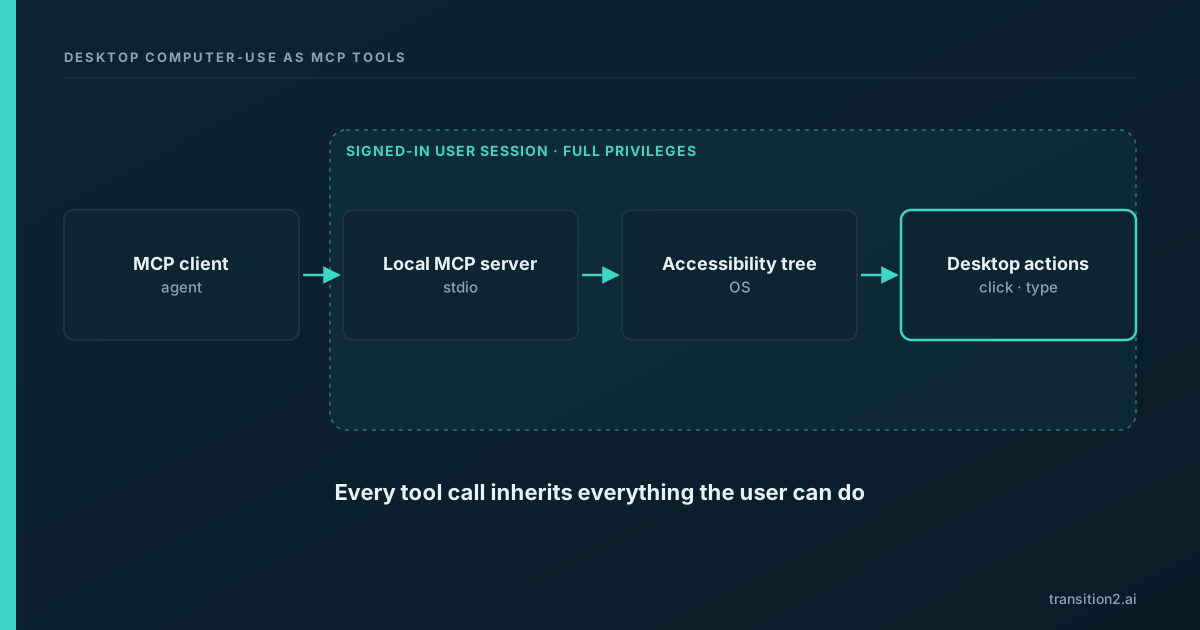
On the evening of November 4, 2026 (Pacific time), Vercel Labs published agent-desktop v1.2.0 with a new agent-desktop mcp command (release notes). It serves every agent-desktop command as a Model Context Protocol (MCP) tool over stdio, according to the project's MCP guide. In practice, any MCP-capable agent can now drive a desktop through structured commands. Those commands act with the signed-in user's full session privileges, so the blast radius of a mistake is everything that user can reach.
What happened
agent-desktop is an open-source CLI and C library from Vercel Labs that lets an agent read and operate desktop apps on macOS, Windows and Linux through the operating system's accessibility tree, the structured description of on-screen elements that screen readers rely on. Instead of interpreting screenshots, the agent reads each app's tree as JSON, acts on a reference to a named button, field or menu, then reads the app again to check the result. The project notes that agent-desktop has no model inside; the loop lives in the calling agent.
The v1.2.0 release lists the change as "feat: agent-desktop mcp". Running agent-desktop mcp starts a local MCP server over stdio, the standard input and output channel MCP clients use for locally launched servers. The MCP guide explains that every command becomes a tool, so a client gets the same surface as the CLI, and that the tool list is read from the installed binary's own command definitions.
The guide is direct about the consequence: a tool "still has the CLI's full reach", it can operate any app the accessibility tree exposes, and the project advises treating the server "like a shell for the signed-in user". It also warns that text read from the screen is untrusted input to the model, and recommends keeping the client's confirmation step on for actions. The server caps itself at eight concurrent tool calls.
Why it matters
Desktop control for agents is not new. What changes with this release is the integration effort. Before, connecting an agent to a desktop meant custom glue for a specific agent framework. With an MCP server, the same capability becomes a drop-in for any MCP client. That is good for builders and it is also exactly why governance teams should look closely: capabilities that are easy to add tend to get added without review.
The accessibility tree makes control more reliable. Working from structured elements rather than pixel coordinates generally makes an agent's actions more precise and easier to log in readable form, because each step names the element it touched. That is a real improvement for auditability compared with screenshot-driven approaches.
The privilege model is the user's, in full. A browser agent is usually limited to what happens inside the browser. A desktop agent acting through the accessibility tree can reach any application in the session: email, chat, file managers, terminals, password prompts, and administrative consoles. If the user is signed in to it, the agent can operate it. That is what "blast radius is the whole session" means.
Agents read untrusted content. Any agent that reads documents, web pages, or messages can encounter text written to steer it. This class of issue, usually called prompt injection, is well documented across agent systems. On a desktop with full session privileges, the consequences of a successful injection are broader than in a sandboxed tool, because the set of reachable actions is broader. The general mitigations are the same as elsewhere: limit what the agent can reach, require confirmation for consequential actions, and keep a record of what it did.
Local stdio servers sit outside network controls. A stdio MCP server runs as a local process launched by the client. It does not pass through a network gateway where an organisation might otherwise inspect or restrict traffic. Policy for which MCP servers may run has to be enforced on the endpoint and in client configuration.
The Enterprise AI Governance hub covers how to bring agent connectors under existing access policy, and AI Reliability & Operations covers monitoring for agent actions.
What it means for businesses
Treat a desktop MCP connector like production administrative access, because in effect that is what it grants. Three controls matter most.
First, scope the machine. Run desktop agents on dedicated machines or virtual desktops with accounts created for that purpose, not on an employee's everyday workstation where every personal and corporate session is signed in.
Second, apply least privilege to the account. The agent's reach equals the account's reach, so the account should hold only the access the workflow needs.
Third, audit the session. Keep a record of each tool call the agent makes and the element it acted on, and review it the way you would review privileged access logs.
Add desktop MCP servers to the list of tools that require approval before installation. If your organisation already manages which browser extensions or remote-access tools are allowed, the same process should cover MCP servers.
What it means for AI users
An agent with desktop MCP can click, type, and open whatever you can. If you connect one to your own signed-in session, it can reach your email, your files, and every application you are logged in to.
Before enabling it, close or sign out of anything the task does not need. Prefer agents that ask for confirmation before sending, deleting, or changing settings, and watch the first runs closely. If an agent starts acting on instructions that came from a document or page rather than from you, stop it.
What it means for developers
Sandbox desktop agents. A virtual machine or dedicated test account with only the applications the task requires keeps mistakes contained and makes runs reproducible.
Require explicit confirmation for high-risk tools and actions. Sending messages, submitting forms, changing permissions, and deleting files should pause for a person unless the workflow has been reviewed and the account is scoped to make the action harmless.
Log every MCP tool call with the target element and the resulting state, and keep those logs separate from the agent's own context so they cannot be altered by the run. Restrict who can read them: the project's README warns that snapshots, clipboard reads and screenshots can contain private desktop content and should stay out of public logs.
Do not ship desktop MCP on shared workstations without a written policy covering which machines, which accounts, and which tools are allowed. Measure reliability before scaling: track task completion rate, the share of runs needing human correction, and how often confirmations are triggered, so the decision to expand rests on observed behaviour.
Sources
- agent-desktop v1.2.0 release (accessed 2026-11-06)
- agent-desktop MCP guide (accessed 2026-11-06)
- agent-desktop README (accessed 2026-11-06)